Most people use the internet every day without ever seeing what’s actually happening under the hood. We click links, send messages, stream videos—and everything just works.
But beneath that simplicity lies a constant flow of packets: tiny chunks of data moving across networks at incredible speed.
If you’ve ever wanted to see that invisible layer, Wireshark is where things get interesting.
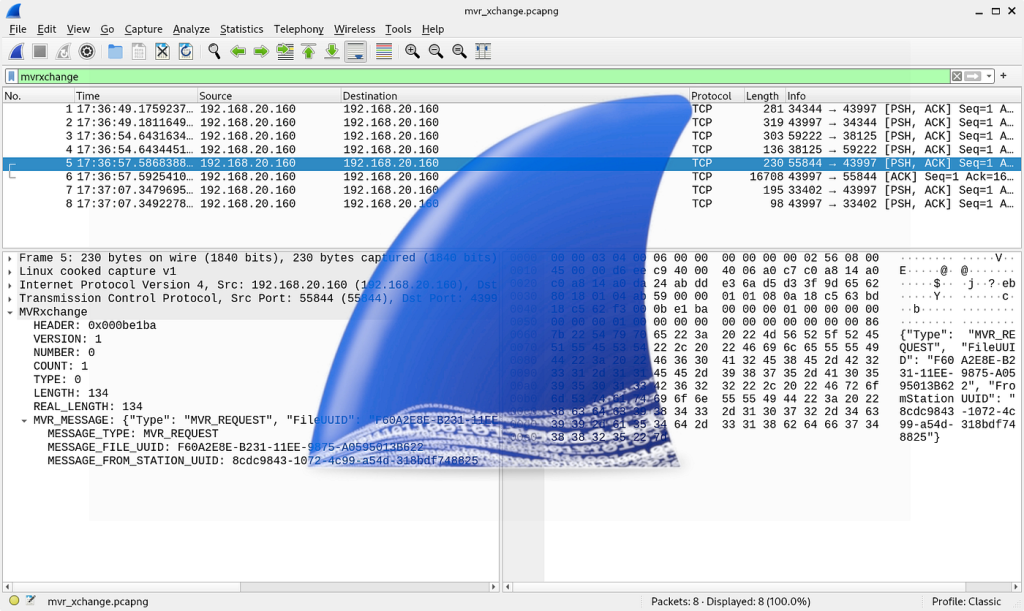
Wireshark is a network protocol analyzer—a tool that lets you capture and inspect the data traveling across a network in real time.
Think of it as:
It shows you exactly what data is being sent, where it’s going, and how it’s structured.
At first glance, Wireshark can feel overwhelming. Thousands of packets, cryptic protocols, endless columns.
But once you understand it, it becomes incredibly powerful.
When something breaks, logs don’t always tell the full story. Wireshark shows:
Instead of guessing, you see the problem.
Wireshark is widely used in cybersecurity to:
It’s not a hacking tool—but it’s often used to understand how attacks work.
If you want to truly understand networking, there’s no better teacher.
You can observe:
It turns abstract concepts into something tangible.
Let’s say you open a website.
Behind the scenes, Wireshark will show something like:
What feels instant is actually a series of precise, structured steps.
Wireshark doesn’t just capture packets—it decodes them into human-readable formats.
Instead of drowning in data, you can filter traffic like:
http
dns
ip.addr == 192.168.1.1
tcp.port == 443
This turns chaos into clarity.
You can watch traffic as it happens, which is incredibly useful for debugging live systems.
Let’s be honest—Wireshark is not beginner-friendly.
The interface can feel intimidating:
But once you learn:
…it becomes one of the most valuable tools in your toolkit.
If you work with systems, networks, or APIs—this tool will give you an edge.
Wireshark changes how you see the internet.
It takes something invisible and makes it observable.
It turns guesswork into evidence.
It forces you to understand how things actually work.
And once you’ve used it, you’ll never look at a “simple” web request the same way again.
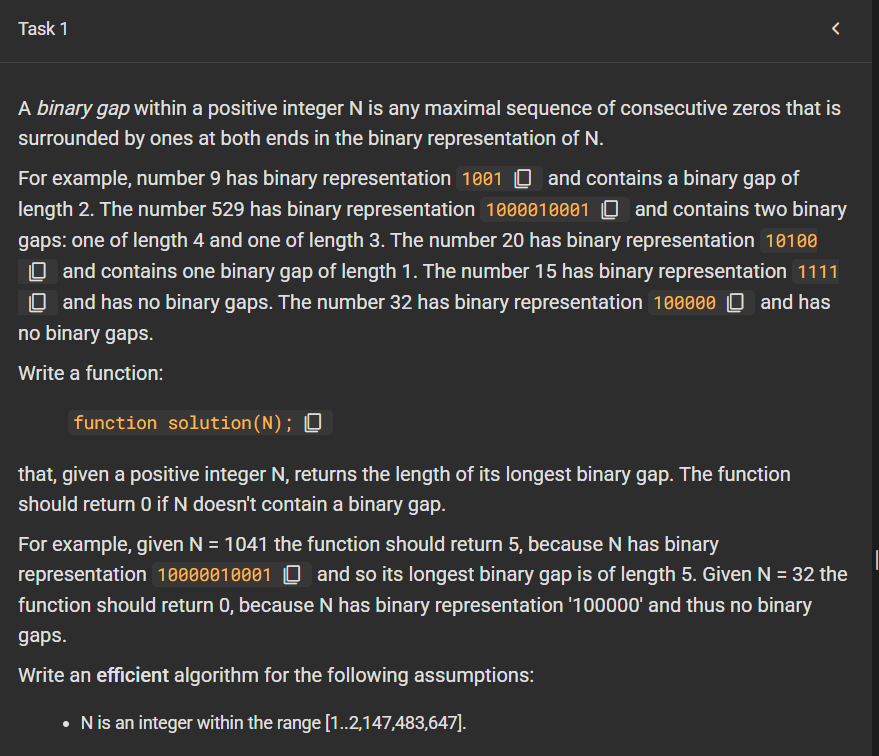
A binary gap within a positive integer N is any maximal sequence of consecutive zeros that is surrounded by ones at both ends in the binary representation of N. For example, number 9 has binary representation 1001 content_copy and contains a binary gap of length 2. The number 529 has binary representation 1000010001 content_copy and contains two binary gaps: one of length 4 and one of length 3. The number 20 has binary representation 10100 content_copy and contains one binary gap of length 1. The number 15 has binary representation 1111 content_copy and has no binary gaps. The number 32 has binary representation 100000 content_copy and has no binary gaps. Write a function: function solution(N); content_copy that, given a positive integer N, returns the length of its longest binary gap. The function should return 0 if N doesn’t contain a binary gap. For example, given N = 1041 the function should return 5, because N has binary representation 10000010001 content_copy and so its longest binary gap is of length 5. Given N = 32 the function should return 0, because N has binary representation ‘100000’ and thus no binary gaps. Write an efficient algorithm for the following assumptions: N is an integer within the range [1..2,147,483,647].
// you can write to stdout for debugging purposes, e.g.
// console.log('this is a debug message');

function solution(N) {
  const binary = N.toString(2);
  let maxGap = 0;
  let currentGap = 0;
  let counting = false;

  for (let char of binary) {
    if (char === "1") {
      if (counting) {
        maxGap = Math.max(maxGap, currentGap);
      }
      counting = true;
      currentGap = 0;
    } else if (counting) {
      currentGap++;
    }
  }

  return maxGap;
}

At first glance, a Fibonacci function seems like a simple coding exercise. You take a number n, and return the nth number in the Fibonacci sequence:
0, 1, 1, 2, 3, 5, 8, 13, 21…
Each number is the sum of the two before it.
Many beginners write Fibonacci using recursion because it feels natural. But while recursive code looks elegant, it can hide a major performance problem.
The Classic Recursive Version
var yourself = {
    fibonacci : function(n) {
        if (n === 0) {
            return 0;
        } else if (n === 1) {
            return 1;
        } else {
            return this.fibonacci(n - 1) +
                this.fibonacci(n - 2);
        }
    }
};
This works correctly, but it becomes painfully slow as n grows.
Why?
Because the function keeps solving the same subproblems repeatedly.
For example, to calculate fibonacci(6), it must calculate:
fibonacci(5)fibonacci(4)But inside fibonacci(5), it calculates fibonacci(4) again.
Then deeper down, it recalculates fibonacci(3), fibonacci(2), and so on many times.
The result is a lot of wasted work.
Memoization is a technique where you store previously calculated results so they can be reused instantly.
Instead of recalculating fibonacci(4) ten times, compute it once and save it.
Here’s the improved version:
var yourself = {
    cache: {},

    fibonacci: function(n) {
        if (n === 0) return 0;
        if (n === 1) return 1;

        if (this.cache[n] !== undefined) {
            return this.cache[n];
        }

        this.cache[n] =
            this.fibonacci(n - 1) +
            this.fibonacci(n - 2);

        return this.cache[n];
    }
};The object contains two parts:
cache: {}This stores answers that were already computed.
Example after running:
{
  2: 1,
  3: 2,
  4: 3,
  5: 5
}When asked for a value:
0 or 1, return immediately.The recursive version can explode into thousands or millions of repeated calls.
The memoized version calculates each Fibonacci number once.
That turns a slow problem into a fast one.
This is not really about Fibonacci.
It teaches an important programming principle:
If a problem repeats the same work, store results and reuse them.
This idea appears everywhere:
Sometimes the smartest code is not code that does more work. It is code that avoids doing the same work twice.
That small cache: {} line transforms a beginner exercise into a lesson in efficient thinking.
Senior software developers collaborate with business and quality analysts, designers, project managers and more to design software solutions that will create meaningful change for our clients. They listen thoughtfully to understand the context of a business problem and write clean and iterative code to deliver a powerful end result whilst consistently advocating for better engineering practices. By balancing strong opinions with a willingness to find the right answer, senior software developers bring integrity to technology, ensuring all voices are heard.
For a team to thrive, it needs collaboration and room for healthy, respectful debate. Senior developers are the technologists who cultivate this environment while driving teams toward delivering on an aspirational tech vision and acting as mentors for more junior-level consultants. You will leverage deep technical knowledge to solve complex business problems and proactively assess your team’s health, code quality and nonfunctional requirements.
This means more than just years of experience. It usually implies the person can:
This refers mainly to backend development using Java. Typical responsibilities include:
This means they work on both:
Server-side systems, databases, APIs, cloud infrastructure
User-facing interfaces in the browser
This means they are also strong in frontend technologies like:
A Senior Java Full Stack Developer may:
Examples often include:
When hiring for this role, employers often want someone who can:
Tab Autocompletiontouch [filename] to quickly create empty filesgrep to search within filesrm, mv, cp, and common file opsmv), copy (cp), or delete (rm) files/directories—fundamental for filesystem management. (Medium)cd, ls, pwd, mkdir, ps, sudo&& to chain commandsnpm install && npm test, so the next command only runs if the previous succeeded. (codeburst)pbcopy < file (macOS)cmd + d, cmd + shift + d)imgcat to preview images inline in iTerm2open . (macOS)| Trick | What It Does |
|---|---|
Ctrl + R | Reverse search command history |
Tab autocompletion | Auto-completes commands/paths |
touch [file] | Creates a new empty file |
grep [pattern] [file] | Searches text within files |
&& operator | Chains commands conditionally |
pbcopy < file | Copies file content to clipboard (macOS) |
iTerm2 splits (cmd + d, etc.) | Opens multiple panes in one terminal |
imgcat | Displays images inline in terminal (iTerm2) |
open . | Opens current folder in GUI (macOS) |
fzf for interactive fuzzy findingIntegrate fzf, a fuzzy-finder tool, into your custom scripts—for example, to select Git branches or AWS EC2 instance options interactively. This turns typing long commands into quick, user-friendly selections.bitsand.cloud
/dev/stdinInstead of traditional heredoc syntax, piping input through /dev/stdin offers a simpler and shell-agnostic way to feed multi-line input—especially useful if you’re not using Bash.bitsand.cloud
Optimize SSH workflows by enabling multiplexing in your ~/.ssh/config. Reusing existing connections avoids repetitive authentication—great if you’re jumping between servers frequently.bitsand.cloud
git checkout - to toggle between branches, just like cd - for directories.!$, $_, or Alt + ..pushd and popd to manage directory stacks (or nextd/prevd in fish).sudo tee, e.g., command | sudo tee file.bitsand.cloudfind, grep, awk, and sed workflowsfind — locate files by type, size, or modification date:find /project -type f -name "*.js" -size +1M -mtime -7Mediumgrep -E — powerful regex search:grep -E "function\s+\w+\s*\(.*\)" file.jsMediumawk — quick analysis:awk '/ERROR/ {count++} END {print count}' application.logMediumsed — stream-editing scripts; great for automated transformations.MediumAvoid external tools for string manipulation—use built-in expansions instead:
filename="/path/to/document.pdf"
name="${filename##*/}"           # document.pdf
base="${name%.*}"              # document
extension="${name##*.}"        # pdf
clean_line="${log_line//[ERROR]/[WARN]}"
config="${CONFIG_FILE:-/etc/myapp/config.conf}"
database="${DATABASE_URL:?DATABASE_URL must be set}"
Arrays in Bash (declare -a or declare -A) unlock powerful data handling and cleaner scripts.Medium
ml-autocompleter in Oh My Zsh for smarter suggestions.DEV CommunityDeepen your shell expertise with:
( … ) to run commands in a separate shell environment.Wikipediaecho file{1..4}.txt generates file1.txt file2.txt …Wikipedia<(...) or >(...)&, jobs, fg, bg, and kill to manage parallel tasks.Wikipedia| Tip Category | Use Case |
|---|---|
fzf | Interactive selection in scripts and workflows |
/dev/stdin | Cleaner alternative to heredocs across shells |
| SSH multiplexing | Reusing secure connections without re-authentication |
| Bash/fish shortcuts | Boost navigation and efficiency with shorthand bindings |
find, grep, awk, sed | Advanced file searching, parsing, and editing |
| Parameter expansion & arrays | Efficient string handling and data structures in scripts |
| ML autocompletion & UI | Smarter typing assistance and terminal usability |
| Shell internals & job control | Advanced scripting patterns and process management |
Introduction
In a world dominated by the internet, we often take for granted the complex processes that enable us to access websites, send emails, or stream our favorite shows seamlessly. One such critical component of this digital ecosystem is the Domain Name System (DNS). DNS is the unsung hero that translates human-friendly domain names into IP addresses, making it possible for us to access websites and services with ease. In this blog post, we’ll delve into the world of DNS, demystifying its importance and functionality.
DNS, or the Domain Name System, is essentially the internet’s phonebook. Instead of remembering the numerical IP addresses (e.g., 192.168.1.1) that computers use to identify each other, we use domain names (e.g., www.example.com) that are easier for humans to recall. DNS acts as the intermediary that translates these user-friendly domain names into IP addresses, allowing your device to connect to the right server on the internet.
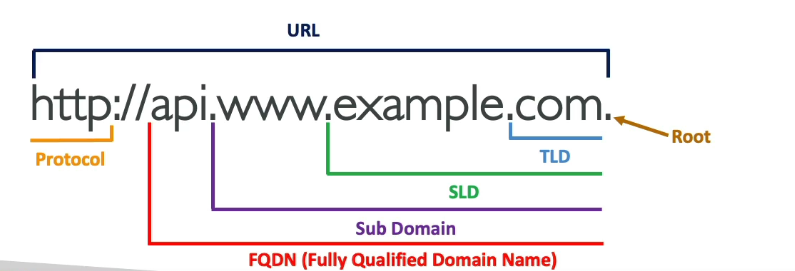
The DNS system works like a hierarchical and distributed database. It involves several key components:
Most internet service providers (ISPs) provide DNS resolvers for their customers. However, there are also public DNS services like Google DNS (8.8.8.8 and 8.8.4.4) and Cloudflare DNS (1.1.1.1) that you can use for faster and more reliable DNS resolution.
The DNS is a fundamental part of the internet’s infrastructure, and it’s essential to ensure its security. DNSSEC (Domain Name System Security Extensions) is a set of extensions to DNS that adds an extra layer of security by digitally signing DNS data. This prevents DNS spoofing and ensures that the DNS records you receive are authentic and haven’t been tampered with.
DNS is the unsung hero of the internet, silently working behind the scenes to ensure that you can access websites and services by simply typing in a domain name. Understanding how DNS works can help you appreciate the complexity of the internet’s infrastructure and make informed choices about the DNS resolver you use. So, the next time you browse the web, remember that DNS is the backbone that makes it all possible.